Use the Account menu
The Account menu provides you access to personal customization options. This menu appears in the upper-right corner of all screens and shows your initials or your profile photo, if you have uploaded one.
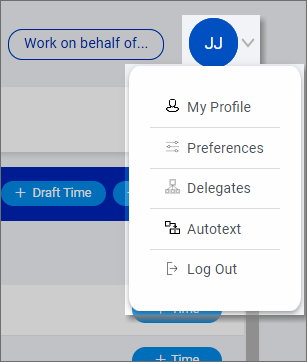
The following options are available in the Account menu.
|
Option |
Use to: |
|---|---|
|
My Profile |
View your assigned roles, upload a profile photo, change your inactivity timeout setting, and reset your password. See View your user profile and assigned roles, Upload a profile photo, Change your inactivity timeout setting, and Update your password. |
|
Preferences |
Set your preferences for options in different modules. See Set your preferences. |
|
Delegates |
Assign delegates to work on your behalf. For example, you might assign an administrative assistant as a delegate to enter and release your time for you. See Assign delegates to perform tasks on your behalf. |
|
Autotext |
Add autotext codes for frequently used narrative text to automatically replace a shorter code with longer text. See Manage autotext codes. |
|
Log Out |
Log out of SurePoint Cloud. See Log out. |
