Use the SurePoint Microsoft Office 365 plug-in
If your firm has configured the SurePoint plug-in for your Microsoft 365 service, you can use the plug-in to record time and submit time entries to SureTime while working in Office files, including Excel spreadsheets, Outlook emails, PowerPoint presentations, and Word documents.
Note: Only users who are set up as a timekeepers can log in and use the SurePoint plug-in.
Tip: SurePoint Cloud also integrates with Microsoft Outlook Calendar to automatically create time entries based on events on users' calendars. A Microsoft 365 administrator first needs to configure this integration for SureTime.
 Enable the plug-in
The SurePoint plug-in should automatically appear on the Home ribbon in Office 365 applications after it has been set up by your firm's Microsoft administrator. However, if you do not see the plug-in, you can enable it in each Office 365 application you want to use it in.
-
In Outlook, click Get Add-ins on the Home ribbon.
In Excel, PowerPoint, and Word, click the Insert ribbon and then click Get Add-ins.
-
Click Admin-managed.
-
Select the SurePoint add-in and then click Add.
The plug-in will appear on the Home ribbon in the Office 365 application.
Create time entries
-
In Outlook, click
 on the Message ribbon.
Note: The SurePoint plug-in is only enabled on the Home ribbon in your Outlook inbox if you have the Reading pane turned on in your view. If you do not use the Reading pane, you must open an email to use the enabled plug-in on the Message ribbon.
In Excel, PowerPoint, or Word, click
on the Home ribbon.The SurePoint plug-in opens in the side panel.
-
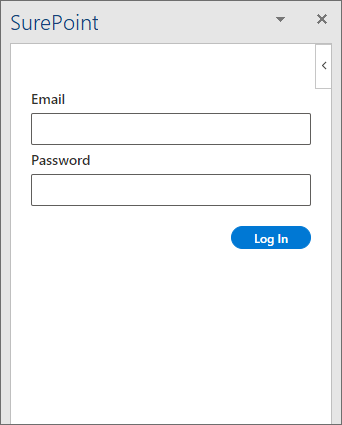
Enter the Email address and Password for your SurePoint Cloud account and then click Log In.
Note: When you log into the app in either Excel, PowerPoint, or Word, your session is automatically shared with the plug-in in these Office 365 applications. You must always log into the plug-in at least once in Outlook because this session is not shared with other Office 365 applications.
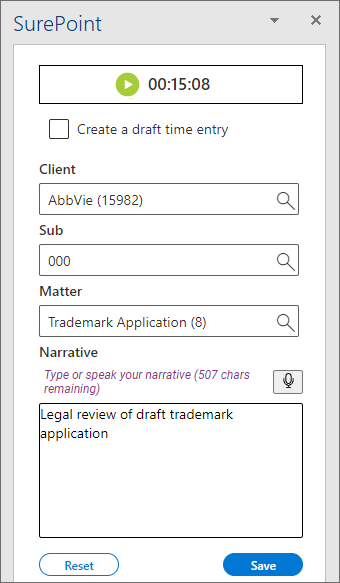
The time entry options appears.
Note: When the SurePoint pane is open and you are logged in, the plug-in can automatically capture a time entry for you in case you forget to start the timer or submit the time entry yourself before you close your file. Once you have entered a subject and some content in an Outlook email or entered some content and saved an Excel, PowerPoint, or Word file, the plug-in will create an automatic time entry for you and insert the subject or file name as part of the narrative. You can reference this file name when reviewing these time entries in SureTime to help you remember the work and complete the time entry appropriately.
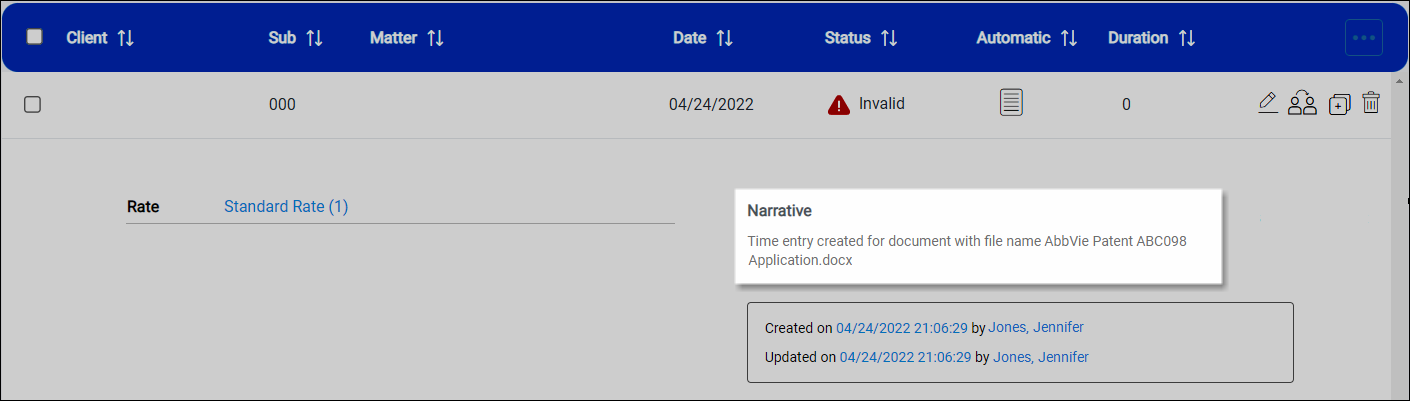
The plug-in checks your open file every 60 seconds to determine if an automatic time entry should be created. If an automatic time entry is created for you and you then use the plug-in to enter the appropriate information and submit your time entry, the existing automatic time entry is updated with the information you provide. Continue with step 3 for information about entering time entry information.
If the email has not been started or the file has not been saved after 20 minutes, the plug-in will stop checking and an automatic time entry will not be created. Only one automatic time entry will be created per file name and date. If the file name changes on the same day, a separate automatic time entry will be created.
-
Click
 to start the timer that captures the duration for the time entry. The timer is the only way to enter a duration.
-
To pause and then resume the timer, click
 and
and  , as needed.
 -
To delete the captured time, click
 . Click Yes to confirm the deletion. The timer resets to 0:00:00.
-
-
When you finish your work, click
 to keep the captured time.
 -
Optionally select Create a draft time entry if you want the time entry to be saved for a draft client and/or matter before an official client/matter system record has been created.
-
If you are creating a client/matter-specific time entry, select the Client, Sub client, and Matter. The Sub client field is only available if your firm uses sub clients.
If you are creating a draft time entry, enter a placeholder Client name and Matter description, up to 50 characters each. You can enter 000 as the Sub client number or leave the field blank. The Sub client field is only available if your firm uses sub clients.
-
Enter a Narrative for the time worked.
You can also click
 to dictate a narrative. To stop recording, click again.
Autotext codes and replacement suggestions for restricted words are also supported in narratives for time entries created through the SurePoint Office 365 plug-in. For more information about using voice dictation, autotext codes, or restricted words with time entry narratives,
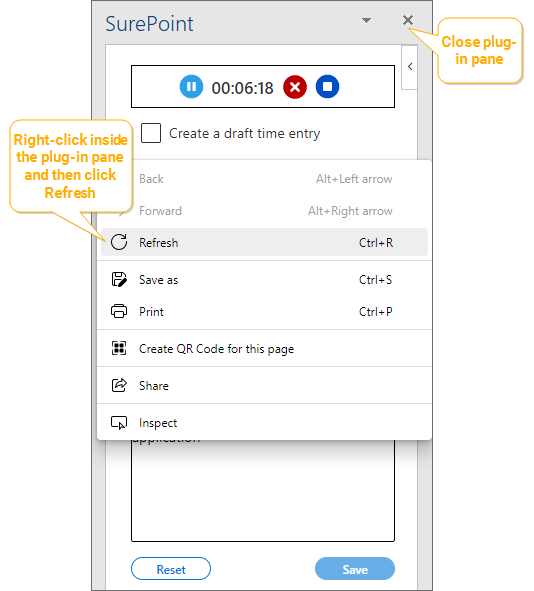
Note: Only autotext codes that exist when the SurePoint plug-in pane is first opened are available for use in narratives. If a new autotext code is created while the time entry is being recorded, right-click on the pane and then click Refresh to retrieve the new shortcut. You can also close the plug-in pane and then open it again to retrieve new autotext shortcuts; however, closing the pane will lose any values you have already entered.
-
Click Save to save the time entry in SureTime.
Note: If the timer is still running, no time has been captured, or a client, sub client, or matter have not been provided, the Save button is disabled. Make sure to use and then stop the timer and provide a client, sub client, and matter to enable the Save button.
The time entry is saved with an Invalid status and it must be edited in SureTime to set the required time entry codes, and a client and matter for a draft time entry, before it can be released.
-
To discard the time entry settings and captured time, click Reset. The screen is cleared and you can start a new time entry.
View time entries in SurePoint Cloud
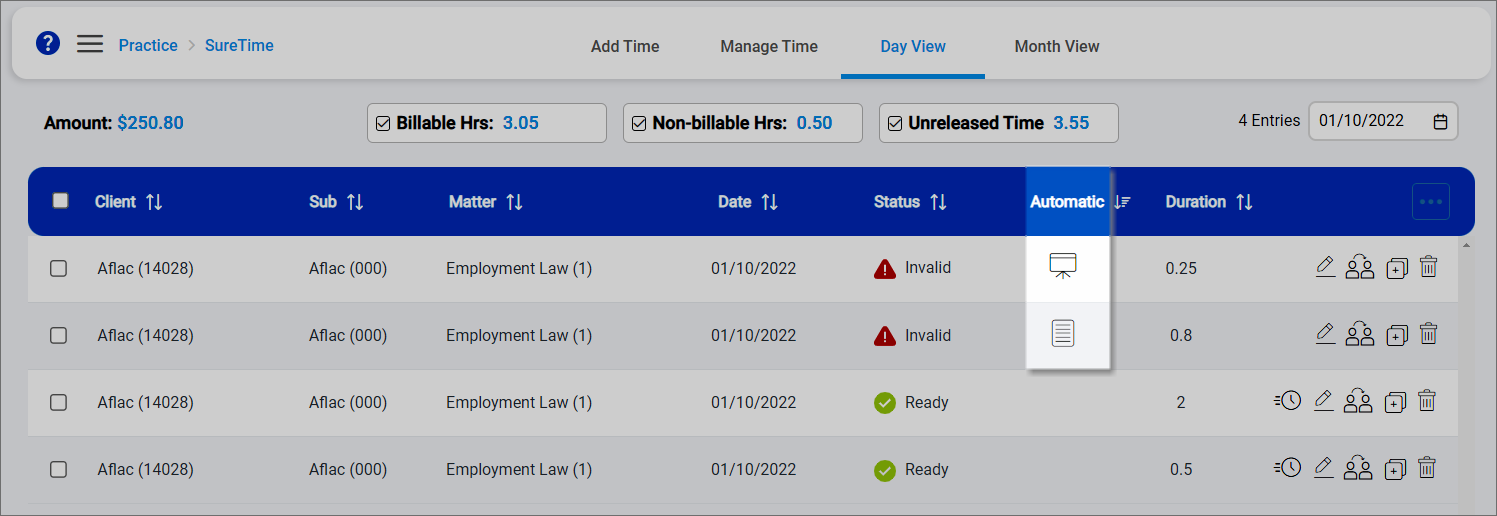
Time entries that were created through the SurePoint Office 365 plug-in have one of the following indicators next to them on the Manage Time and Day View screens in SurePoint Cloud.
|
Indicator |
Time entry created from |
Created by user |
|---|---|---|
|
|
Excel |
Spreadsheet |
|
|
Outlook |
|
|
|
PowerPoint |
Presentation |
|
|
Word |
Document |


Note: Only errors for required codes are shown in the expanded details on the Manage Time and Day View screens for time entries created through the SurePoint Office 365 plug-in. Default values configured for time entry codes are not set in these time entries. If you edit one of these time entries and then save the changes, you may see new or different errors to address after saving the changes.
