Select who to work on behalf of
Delegates are the representatives who can complete work on behalf of another user. Any user who has assigned you as their delegate is listed in the Work on behalf of menu next to the Account menu in the upper-right corner of the screen. If you need to add or manage tasks for another user, use this menu to switch select the user whose tasks you need to complete. For example, if a senior partner assigned you as their delegate to release their time at the end of each week, you can select the partner from this menu to access their clients, matters, and time entries.
Note: When you work on behalf of another user, your name is displayed as the Created By and Updated By user on screens and the user you are working on behalf of's name is stored in the database.
-
In the module you need to work in, click Work on behalf of next to the Account menu in the upper-right corner of the screen.
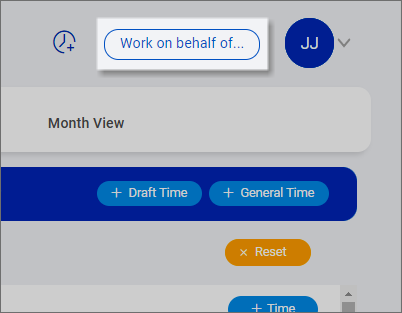
Note: If you are already working on behalf of another user, that user's name is displayed under 'Working on behalf of'.
-
Select the user to work on behalf of. The list of users varies based on the module you are working in and who has assigned you as their delegate for features in that module.
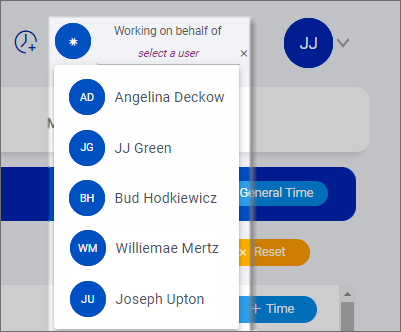
When you select a user to work on behalf of, that selection remains in place until you switch to a different user or clear the selection to revert back to working on your own behalf.
-
To switch to a different user, select their name from the list.
-
To revert back to working on your own behalf, click
 to clear the selection.
-
